Admin Menu
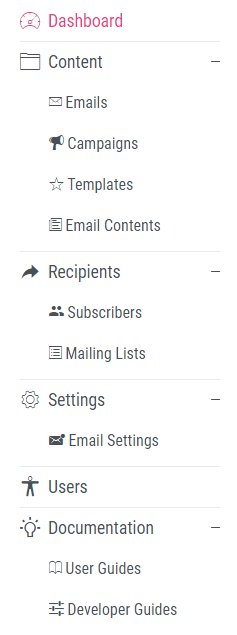 Along the left-hand side of any page in the system you will see the admin sidebar. Depending on the user privileges given to you by the system admin you may see all or only some of the described sections and their contents.
Dashboard
The main page seen at login containing summaries of the last email statistics and subscribers if any information is available.
Content
Emails
The Emails section contains all previously sent and drafted emails showing subject, sender, number of recipients, delivery status, creation date and sent date. The eye icon allows you to view the email details and the chart icon will allow you to view stats for that email if they are available. The page also contains a search bar and filter to quickly search all emails. The new and edit email pages are accessed from this section.
Campaigns
The Campaigns section shows all campaigns, each displaying the name of the campaign, the number of emails included in the campaign, the date each was last updated, and the eye icon which allows you to view more details about the campaign. The new and edit campaign pages are accessed from this section.
Templates
The Templates section shows all templates in the system with their name, last person to edit them, when they were last updated and the eye icon to view more details. The new and edit template pages are accessed from this section.
Email Contents
The email contents section shows all the email contents in the system. The new and edit email contents pages are accessed from this page.
Recipients
Subscribers
The subscribers section contains all of the subscribers to your mailing lists. From this section new subscribers can be uploaded and old subscribers edited or deleted.
Mailing Lists
The mailing lists section shows all mailing lists in the system, displaying their name, number of subscribers and when they were last updated. The eye icon can also be used to view more details about the mailing list. The new and edit mailing lists pages are accessed from this section.
Settings
Email Settings
The email settings section shows all auto populated email fields and their values. The new and edit email settings pages are accessed from this page.
Users
Here depending on your user privileges you will be able to see and edit your account details and system super admins will be able to see and edit details of other users along with adding new users.
Documentation
User Guides
The user guide section contains the editable version of this guide. New sections of the guide can be created here, edits made and sections deleted if you have the correct user privileges.
Developer Guides
The developer guide section contains the editable version of the developer guide. New sections of the guide can be created here, edits made and sections deleted if you have the correct user privileges.